ProseMirror is a JavaScript-based toolkit for developers to build their own rich-text editors on the web. It powers many of the commonly known editors used by websites like GitLab, Substack, Jira, The New York Times, wrappers like Tiptap, and many more.
Background
I was assessing a markdown editor’s interface for vulnerabilities on a famous website, and noticed from the browser inspector that it was built on ProseMirror. As of the date of writing this article, the most recent versions of ProseMirror’s view component were 1.42.4 to 1.42.6, about a week old. Very fresh!
Websites often lag behind on updating components this early, (and this is a mistake, especially if the new versions contain security updates).
Looking at the GitHub repository, I found a month old security advisory (GHSA-c8x8-7fp4-3x9w). It affects all versions pre-1.42.3, meaning it was patched in 1.42.3.
The impact is described as:
When a user pastes attacker-provided HTML into a ProseMirror editor component,
this can cause attacker-controlled JavaScript code to run in the browser window
containing the editor.
The change log on the 1.42.3 (2026-08-25) release has an even more interesting note:
Run attribute validators on attributes provided via slice context in clipboard
content. This closes an XSS vulnerability (found by Pedro Paniago).
Marijn Haverbeke described it on the ProseMirror forum as an “issue that allows an attacker that is able to get the user to paste HTML crafted by them into a ProseMirror editor to run arbitrary JavaScript code in the editor’s browser window”, and recommended immediate updates.
With that information in mind, and the fact that it is unlikely patched on my target, I set to investigate the codebase and documentation in order to replicate the described vulnerability.
As the vulnerability was fixed in prosemirror-view 1.42.2 → 1.42.3, we can diff the code in order to identify the developer’s modifications. ProseMirror is also very well-engineered and documented; and with the help of AI agents at our disposal, this makes it much easier to find, explain, and review all the relevant functions for the copy and pasting mechanisms.
Unfortunately I was not able to construct a working payload for my target, as the exploitation conditions were not present. However, the code review on its own was a fun exercise. More on this at the end.
Introduction
What is ProseMirror?
The main idea behind ProseMirror is that it maintains its own document model (a tree of typed nodes) separate from the browser’s DOM. A schema defines what node types can exist (like paragraphs, headings, images) and the way they are nested. The document is built strictly from nodes that conform to this schema.
Node types define a toDOM function that describes how the node is converted into a real DOM element. It essentially decides which attributes reach the page, and ProseMirror renders whatever toDOM returns without sanitizing it.
ProseMirror has four essential modules. The two relevant for this writeup are prosemirror-model, which defines the document model and data structure, and prosemirror-view, which handles the user interface and user interaction.
More on this can be read in the documentation: https://prosemirror.net/docs/guide/
The ProseMirror copy/paste concept
In order to handle copy/paste operations (preserving both formatting and structure) ProseMirror uses “slices”, as documented in this reference.
A slice is the content between two positions in a document. When you copy a selection, the slice keeps that content inside the nodes it came from (e.g. the paragraph or quote around it), and records how many of those nodes were cut open on each side, using openStart and openEnd, i.e. how deep each end of the selection sits in the document.
Keeping the surrounding nodes means any chunk of the document can be handled as a proper tree. Recording which of them were cut open means the chunk can be put back or moved without breaking or duplicating the document’s structure.
HTML has no way of recording whether a paragraph is complete or just a fragment, or that some content came from inside a quote. So when ProseMirror copies a slice to the clipboard, the open numbers and the surrounding nodes would be lost. This is where the data-pm-slice attribute comes into play.
ProseMirror attaches data-pm-slice to the HTML to carry that information along. For example, copying some text from a list item inside a quote produces:
<p data-pm-slice='1 1 ["blockquote",null,"ordered_list",null]'>rst</p>
               │ │  └─ the wrappers that were stripped off (outermost first)
               │ └─ openEnd
               └─ openStart
The array is a list of pairs (a node’s name, then its attributes).
The order of the pairs tells you how it was nested, the first pair is the outermost layer, then the second pair sits inside that layer, and so on. On paste, ProseMirror rebuilds this from the inside out.
Reference: see prosemirror-view’s src/clipboard.ts.
How ProseMirror handles copy/pasting
On copy: ProseMirror takes the selected content as a slice and passes it to
serializeForClipboard(). It converts the slice to HTML and sets thedata-pm-sliceattribute on the first element. The HTML is placed on the clipboard.On paste: ProseMirror reads the HTML from the clipboard and passes it to an internal function
parseFromClipboard()(see prosemirror-view’ssrc/clipboard.ts). This parses the HTML back into nodes using the schema’sparseDOMrules, then looks for adata-pm-sliceattribute in the pasted HTML. If it’s there, ProseMirror re-creates the surrounding nodes from the array, and if it’s not, it makes a best guess at how it should fit in.
Notice that the paste handler accepts whatever data-pm-slice value it finds i.e. there is no mechanism to verify that the attribute was actually written by ProseMirror’s own copy handler (rather by an attacker for example).
Vulnerability Analysis
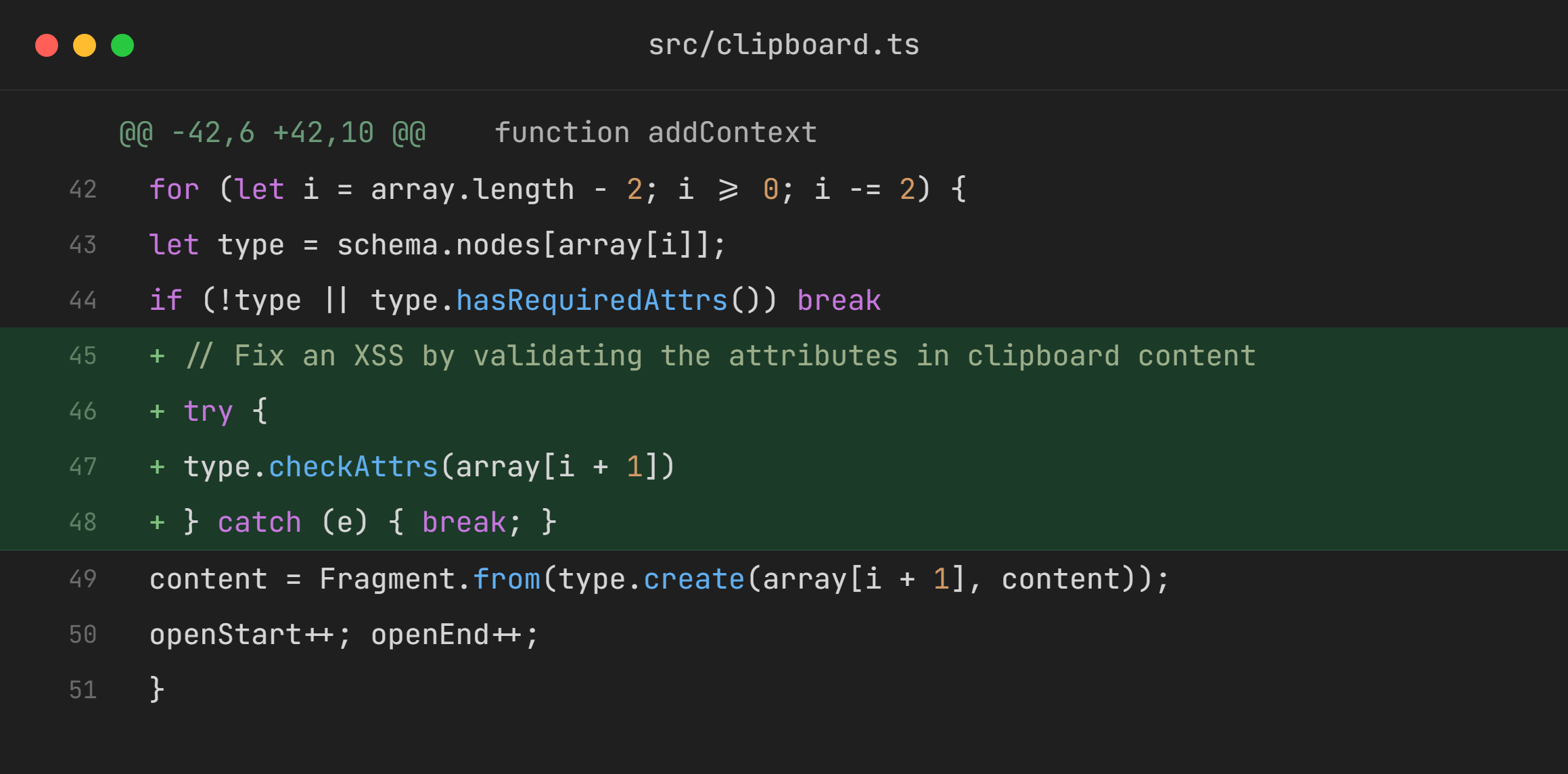
The diff shows that the lines marked with >> were added to this function in clipboard.ts:
function addContext(slice: Slice, context: string) {
  if (!slice.size) return slice
  let schema = slice.content.firstChild!.type.schema, array         (1)
  try { array = JSON.parse(context) }                               (2)
  catch(e) { return slice }
  let {content, openStart, openEnd} = slice
  for (let i = array.length - 2; i >= 0; i -= 2) {                  (3)
    let type = schema.nodes[array[i]];                              (4)
    if (!type || type.hasRequiredAttrs()) break                     (5)
>>  try {
>>    type.checkAttrs(array[i + 1])                                 (6)
>>  } catch (e) { break; }
    content = Fragment.from(type.create(array[i + 1], content));    (7)
    openStart++; openEnd++;
  }
This matches the changelog entry we read earlier: “Run attribute validators on attributes provided via slice context in clipboard content. This closes an XSS vulnerability.” But what does this function do?
By tracing backwards where addContext is called from, we can see a call in parseFromClipboard():
function parseFromClipboard(..) {
    ..
  let contextNode = dom && dom.querySelector("[data-pm-slice]")
  let sliceData = contextNode && /^(\d+) (\d+)(?: -(\d+))? (.*)/.exec (
      contextNode.getAttribute("data-pm-slice") || ""
  )
    ..
    ..
  if (sliceData) {
    slice = addContext( closeSlice(slice, +sliceData[1], +sliceData[2]) , sliceData[4])
  }
At this point the parseFromClipboard function would make sense by reading its counterpart serializeForClipboard (which has been covered earlier). Observe the format of data-pm-slice:
if (firstChild && firstChild.nodeType == 1)
 (firstChild as HTMLElement).setAttribute(
   "data-pm-slice",
   `${openStart} ${openEnd}${wrappers ? ` -${wrappers}` : ""} ${JSON.stringify(context)}`)
sliceData[4] is the raw JSON string from data-pm-slice. It goes straight into addContext() as the context argument, and gets parsed into a JSON array in JSON.parse(context) without validation.
So the function essentially calls addContext with a prepped up slice and a string containing its info.
Now: back to addContext. Essentially it’s a function that helps with rebuilding the wrapper nodes/undoes the copy mechanism’s flattening, returning a new slice. It’s part of the flow which enables pasting.
- Gets the schema from the first node in the slice:
slice.content.firstChild!.type.schema - Declares a variable
arrayand turns the JSON string into a real array. The array is a list of pairs, where each pair contains the node type’s name and its attributes. - The for loop starts at the last pair and steps backwards by 2 (going backwards because the copy records the outermost wrapper first; rebuilding has to start from the innermost wrapper).
- Look up the node type named at
array[i], e.g."list_item". - If the node type doesn’t exist in the schema or has required attributes (attributes without defaults), stop wrapping.
- This is the important part: starting only from 1.42.3, it checks the clipboard-supplied attrs against the node type’s rules (
checkAttrs). If any are invalid it stops wrapping. - Wrap the pasted content inside that node, the relevant part here is that
type.create(array[i + 1])is attacker controlled in the absence ofcheckAttrs.
type.create builds a new node of that type, using array[i+1] as its attributes and the current content as its children. It also internally calls computeAttrs which copies the value of each attribute the schema defines from array[i+1] into the new node’s attributes without checking it; and if a declared attribute is missing, it uses the schema’s default.
As of ProseMirror-model ≤ 1.25.11, no validation checks were present on computeAttrs. This is how the function looks without the validation checks:
create(attrs, content, marks) {
  ..
  return new Node(this, this.computeAttrs(attrs), ..)
}

computeAttrs(attrs) {
  if (!attrs && this.defaultAttrs) return this.defaultAttrs
  else return computeAttrs(this.attrs, attrs)
}

function computeAttrs(attrs: {[name: string]: Attribute}, value: Attrs | null) {
  let built = Object.create(null)
  for (let name in attrs) {
    let given = value && value[name]
    if (given === undefined) {
      let attr = attrs[name]
      if (attr.hasDefault) given = attr.default
      else throw new RangeError("No value supplied for attribute " + name)
    }
    built[name] = given
  }
  return built
}
Later fixes were added (see view 1.42.5, commit 0426a53). checkAttrs call was entirely removed, and the validation was moved to computeAttrs.
addContext only builds wrapper types whose attributes all have defaults. And for those with defaults, any value the attacker supplies replaces the default (model ≤ 1.25.11 combined with view ≤ 1.42.2).
Based on the previous analysis, the application’s schema must meet three conditions for exploitability:
The wrapper’s node type must declare a default value for every attribute. If any attribute lacks a default,
addContext()stops at that wrapper and does nothing.computeAttrsonly copies attributes the schema declares, so the attacker can’t add new ones, only set malicious values for existing attributes.At least one of those declared attributes must flow into the page in
toDOM(e.g:href,src, orstyle). Without the sink the injected values are stored but render harmlessly.
The attrs that survive computeAttrs end up stored on the ProseMirror node. When the editor renders that node to the DOM, it calls the node type’s toDOM function, which renders a malicious element containing our payload.
Conclusion
Given this understanding so far, you might expect that crafting a simple data-pm-slice with a malicious javascript: href on a wrapper node would be enough to land the payload in the document, but that unfortunately doesn’t work.
The internal mechanics for how ProseMirror decides to place pasted content makes naive exploitation unintentionally difficult. And unless you are highly familiar with tracing ProseMirror internals for both your target and the vanilla build, which I’m not, exploitation is beyond scope.
The theoretical attack scenario is straightforward though, an attacker crafts a page by pasting the payload in a specific way and shares the page with their victims; or lures victims into pasting through a specific way (like ClickFix does).
For those building with ProseMirror: toDOM is an important trust boundary. A carefully written schema wouldn’t have been exploitable even on the older versions.
For the readers who don’t care about ProseMirror: tracing a security patch backwards to reconstruct the vulnerability is a key insight; and with AI agents that can write and trace code, the bar for turning patch diffs into working exploits is lower than before.
Thanks for reading!